Showing posts with label computers. Show all posts

Sunday, June 29, 2014

Early Days on Street View

A friend was asking about the early Street View timeline, which prompted a trip down memory lane.  It's been at least five years for most of this stuff, so if anyone has corrections I'm more than happy to apply them.

In 1978, DARPA funded MIT to produce the Aspen Movie Map, which was an interactive LaserDisc-based app for tooling around Aspen Colorado.

In 1996, the Clickwalk project (which I've just learned about thanks to a comment on this post) started in Norway.  By 1999 they had panoramic imagery online.  I'll add more info about this as I find it.

Amazon launched BlockView in January 2005. Because Amazon had no top-down maps interface, it was nearly impossible to navigate using BlockView and it remained a curiosity until it was canned September 2006.

In 2001, Larry Page shot a video from the side window of his car while driving around a few spots in the Bay Area.  His point was that Google had no way to index most of the stuff people interacted with every day.  He showed the video to Marc Levoy, a professor at Stanford, and got Marc some funding.  Marc started the Stanford Cityblock project.  This culminated in Augusto Roman's 2006 thesis "Multiperspective imaging for automated urban visualization". Augusto was producing image strips like this from shooting lots of pictures at the side of the street.


I was hired in June 2006 to work on a Google project which had grown out of the Stanford Cityblock project.  At the time I was hired, we had two copies of the first camera set, which I dubbed R1. These had been assembled by bolting five 11 megapixel CCD based book-scanning cameras (shown below) to a plywood board, and bolting that to the roof of a car, much of which was accomplished by Elliot Kroo when he was, if I'm not mistaken, 14 years old (youngest intern ever at Google). Neither R1 worked much, due to problems with the cameras, not Elliot!
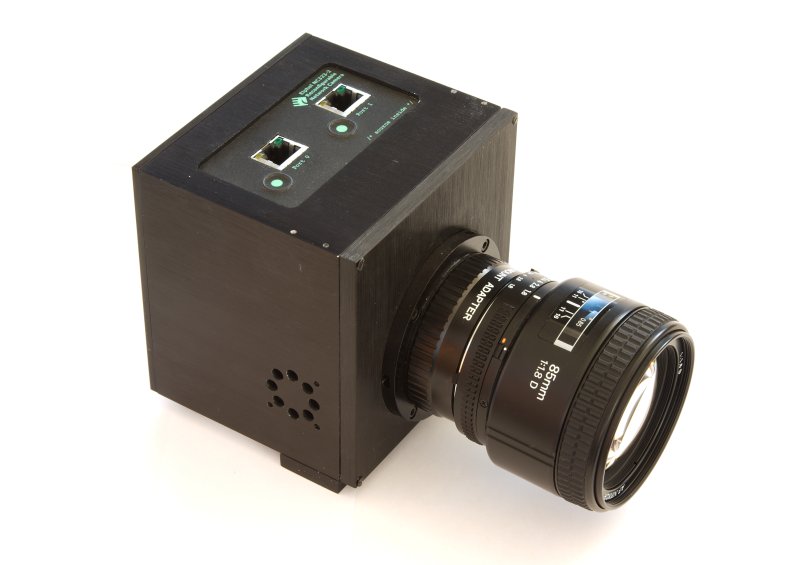
R1 camera

That summer we put together R2, which repackaged R1's electronics and off-the-shelf Sigma 28mm DSLR lenses.  R2 had eight cameras, rather than five, for higher resolution, which turned out to exacerbate the camera problems we were already having with R1.  R2 looked a lot like a tank turret. The vertical slot side-facing port you can see below was for a 4 megapixel 200 frame-per-second camera that would produce the multiperspective strips from Augusto's thesis, and there was one on each side. The need to sink 1600 megapixels per second from those camera drove us to a very large and heavy disk array in the van, one of the many flaky pieces of hardware in this rig. The 8-lens pano camera set on top was a backup for a different user interface, in case the strip UI didn't work. There was also an upward-facing 3 megapixel CMOS camera, meant to complete a hemispherical panorama, but it never really worked.  We never figured out that the camera set wasn't watertight, because so many other things in the system were so broken.

R2 camera

The only watertight things in the rig were those Sick LMS291 laser scanners.  The name is German.

Sick LMS291 laser scanner

The multiperspective strip user interface wasn't very usable and the top pano cam became the focus of our attention.

In late 2006 we were shooting San Francisco with R2 and getting some horrible tearing and blooming artifacts. Whenever a an image of the sun was projected onto the sensor, the photocurrent from that image would overflow the pixel capacitors and flow into other places. Shiny surfaces like car windows and paint would lead to overflows into the readout circuitry, which led to streaks. If the sun was actually in the field of view, the photocurrent was so large it would locally raise the ground voltage in that portion of the sensor. Locally, the CCD would stop shifting, leading to the tearing effect.

We didn't know it at the time, but the problems we were having were essentially due to the high resolution we were trying to shoot. High resolution from a moving platform leads to short exposure times. Short exposure times require large relative apertures to get enough sensitivity. Compared to small format cameras, our focal lengths were fairly long (28 mm), so that meant much larger apertures, much larger photocurrents, and thus the problems we were fighting. In hindsight, the two real solutions were lower resolution or CMOS sensors. Rather than try those, I tried to make the high resolution CCD work with shutters (the R3 camera) and choppers (R4).  Oops.

Anthony Levandowski


Sometime in 2006, Sebastian Thrun started VueTool with six Stanford students that had previously worked on the DARPA/Stanford self-driving car project, one of whom was Anthony Levandowski (later major player on the Google self-driving car project, then stole the tech and took it to Uber, then pardoned by Trump on the last day of his first term). Sebastian had been one of Augusto's thesis advisors, and I think he was a bit exasperated by the slow progress at Google. His team built a far lighter rooftop rig from a Point Grey Ladybug2 camera and three LIDAR scanners, and stitched it together with 80/20 aluminum extrusions. Operating at much lower resolution, the camera did not have the worst artifacts. They had the rig working, on the road, in months, and had a very slick UI with movie-like transitions between navigation points. In early 2007, Google purchased VueTool and most of the existing StreetView team was refocussed on deploying the VueTool rig. By October, we'd shot 1 million miles, at which time dew and rain filled and quickly killed the LadyBug2 cameras, which had been designed for indoor use.

LadyBug2 camera

In May 2007, Street View launched with R2 imagery and imagery purchased from Immersive Media. The VueTool rig was such a success that by the end of the year, most if not all of the launched imagery was from that.

In the last few months of 2007, we knew that the LadyBug2 was not going to work long-term, so we needed another camera for the 2008 driving season. Point Grey was promising the LadyBug3, which would be watertight. I was promising R3 or R4 (and fighting with shutter reliability problems in the lab).  Jason Holt on the Google Geo cam team put together 9 5-megapixel CMOS cameras (as opposed the CCD cameras used by R2 and LadyBug2) and called it R5. The race was on. We dropped R3 & R4, and the camera team went nuts that winter getting R5 to work (and be watertight)! I remember assembling the first R5 to use my custom lenses in February 2008 and driving San Francisco... the day before Jason, in Europe, got the first French imagery from an R5 with off-the-shelf lenses. I was still pretty sore from eating crow on the R3/R4 decision, and I wanted to show at least my lenses worked well.

R5 Camera

LadyBug3 ended up over a year late. R5 had a rough start in Europe, barely making an imagery launch just before the 2008 Tour de France. But it worked.

2008 was a great year for the team, as we had a working rig and strong demand. We spent a lot of time on the assembly line getting the camera yields up and improving focus quality. At the same time, the ops guys were gobbling larger and larger hunks of ground. At each launch, we'd see major traffic blips as the first news reports would let people know they had local imagery.

When an average person discovers that his house is online, he tells a few friends, and some number of them discover their houses are online too. When that number is less than one, which was the case for nearly all our launches, we would see a burst of traffic which was some multiple of the initial population that found out about the new coverage through news reports, etc.

However, when that number is more than one, the discovery ripples through the entire networked population. How big is that network? We found out in August 2008, when we launched all of Australia (and a bit of Japan) in one go. We hit critical mass, and the network effect was insane. I don't remember the exact number, but at one point something like a few percent of the entire Australian population, as well as their overseas friends, were actively clicking on Street View. The traffic spike broke all sorts of things, including the help button on Maps. The next day, I remember seeing one email thread from seriously angry SREs which was getting nasty messages faster than I could read them. SREs are the folks who keep google.com running; they are very smart and enjoy excellent management support -- you do not mess with SREs. So it was important not to be seen high-fiving one another or sporting winning smirks. Thereafter we were required to have very conservative and very expensive budgets for launch traffic spikes.

Fresh from their 2007 success, in 2008 Sebastian Thrun and several members of the former VueTool team pointed out that (a) Google now had all the data sources necessary to make its own street vector database, something it had previously licensed from others, particularly TeleAtlas, and (b) those licenses were very expensive. The inevitable project to build this massive database was known as Ground Truth. By year end, not only did the Street View team have a working product, but we had an internal customer laying down a tight schedule to shoot the entire world. This was like spraying lighter fluid on an already-burning heap of charcoal.

Right in the middle of this huge burst of activity, a wrench went into the works.  Over the winter of 2009 and into 2010 we had fleet stoppages due to lawsuits over collection of WiFi packet payloads. Cellphones use WiFi hotspots, even ones which are encrypted, to figure out where they are, because the stronger signal is easier to pick up and lower power to process than GPS. This works even without a password, because all that is necessary is the station ID (from the unencrypted header), signal strength... and the station location. You can get this data from SkyHook Wireless, but once again Google wanted it's own database. So in theory, we should have just grabbed the header. However, a single wrong line in the configuration file caused us to grab the packet payload too. Had we ever audited the data on the disks, we would have found the bug and fixed it, but... nobody ever noticed. Oops.

R7 camera

Quick aside: the field R5s were slowly accumulating moisture, had 1-5 milliseconds of jitter between cameras, had autoexposure issues, and had a low-resolution upward-facing fisheye that led to an ugly resolution change whenever the user looked up at all.  My boss, Chris Uhlik, wanted me to design our own boards rather than rely on the Elphel electronics we had been using, so that we could kill the synchronization problems and bring the electronic reliability issues in-house where we could apply whatever resources we wanted.  So in the summer of 2008, I stole an intern, George Hotz, from Diego Ruspini (who chose the wrong week to go on paternity leave) and started work on R7, shown above.  George, a.k.a. Geohot, was the same guy who had rooted several generations of iPhones, and later went on to become a rap star.  George and I (but mostly George) prototyped the R7 in 2008, and got some basic bits working by the end of the year.  This was my first board level design and first FPGA design, and it showed: the power system and signal integrity were a joke, and (in retrospect this is all so clear) power glitches were causing unending flaky behavior.  I spent the spring of 2009 redesigning the boards.  During this stage Alessandro Temil transferred into our team and we finally had the engineering critical mass to get the thing done.

George Hotz

It was a good thing too.  Sometime in the summer of 2009 Julie Kim (ops) took my Real Soon Now promises too seriously and filled the basement garage of Google's new offices with Subaru Imprezas waiting for new R7 cameras... which weren't working yet.  Once again, getting the thing watertight was proving to be a problem, and the external baffle (the big red ball) was warping while being welded, which led to some of the overlap areas between cameras not getting sampled at all. The WiFi standdown relaxed pressure on the camera team and let us get the assembly line working better.  We finally got the thing into production during the early part of the 2010 driving season. And amid all the secrecy, a bunch of Googlers actually published an article featuring a teardown of the R7 -- without telling me ahead of time!

As I was the tech lead on this camera, and as the details have been published, allow me to brag a bit. For the first time, the circuit boards and firmware were an entirely internal development. The R7 eliminated essentially all of the major problems with earlier cameras: the individual cameras were synchronized to nanoseconds, the auto-exposure was fast and predictable (and it could shoot HDR if needed), it shot the same resolution in all directions, the relative unit camera orientations were very stable, and it was really watertight. It has a 480GB internal FIFO (flash) that lets the camera outpace the disk drive in the car for long periods if needed. I felt this camera is what I had been hired by Google to do. It still had CMOS rolling shutters, which in combination with vehicle movement make for difficult stitching problems.

The R7 is what Google is using today. I expect they'll be using it for quite some time, as advances in sensors haven't really fixed the problem of high resolution from moving platforms. If a CMOS sensor with a global shutter (no rolling shutter) comes out, they might do a new camera based on that, but I'd be very careful to verify that it works when pointed right at the sun first, as you need to read those pixels near the sun before they've marinated in excess photocurrent for too long.

Postscript

Microsoft chose a different path for Bing Maps, partly funding and contributing to the OpenStreetMap project, which is an open-source alternative to the Google Maps street database. To my knowledge, their imagery collection cars do not directly feed into this project, in the sense of having budgets and deadlines. As a result, their StreetSide project has no revenue source to drive it.

Navteq and TeleAtlas continue to drive the world's streets with cars similar to Google's, but at a somewhat smaller scale, and the imagery from those collections is not published that I know of. One wonders why this imagery doesn't end up at Microsoft, as the oblique imagery from Pictometry does.

The success of Ground Truth cemented Sebastian Thrun's position at Google and made it possible for him to get serious long-term funding for the self-driving car project, which eventually became Chauffeur and then Waymo.

I went on to develop aerial cameras for Google, but that story will have to wait for Google to publish some details.

Wednesday, April 23, 2014

Window 8.1 is unusable on a desktop

For the last two years I've been doing a lot of SolidWorks Simulation on my Lenovo W520 laptop.  This thing has been great.  But I've started doing fluid flow simulations, and it's time for more CPU than a 3.3 GHz (limited by heat load) dual core Sandy Bridge.

So I built a 6 core Ivy Bridge (i7 4930k) which I overclocked to 4.5 GHz.  Very nice.  However, I installed Windows 8.1 on it, which turns out to have been wrong.  This post is for people who, like me, figure that Windows 8 problems are old news and Microsoft must have fixed it by now.

Summary: Nope.

I figured that all those folks bellyaching about the new Windows were just whining about minor UI differences.  Windows 8 should benefit from 3 years of code development by thousands of serious engineers at Microsoft.  The drivers should be better, and it definitely starts up from sleep faster (and promptly serves me ads).   I figured I could deal with different menus or whatever.

I have learned that Windows 8.1 is unusable for a workstation.
  • Metro apps are full screen.  Catastrophe.
    • When I click on a datasheet PDF in Windows 7, it pops up in a window and I stick it next to the Word doc and Excel doc that I'm working on.  In Windows 8, the PDF is full screen, with no way to minimize.  I can no longer cut and paste numbers into Skype.  I can no longer close open documents so that DropBox will avoid cache contention problems.
    • Full screen is fine for a tablet, but obliterates the entire value of a 39 inch 4K monitor.  I spent $500 on that monitor so I could see datasheets, spreadsheet, Word doc, and SolidWorks at the same time.
    • Basically, this is a step back to the Mac that I had 20 years ago, which ran one application, full screen, at a time.
  • Shortly after the build, I cut power to the computer while it was on.  Windows 8 cheerfully told me I had to reinstall the O/S from scratch, and blow away all the data on the machine.  I don't keep important data on single machines, but I still lost two hours of setup work.  That's not nice.  I have not had that problem with Windows 7.
  • I plugged the 4k monitor into my W520 running Windows 7.  It just worked.  My Windows 8 box wants to run different font sizes on it, which look terrible.
  • Windows 8 + Chome + 4k monitor = display problems.  It appears Chrome is rendering at half resolution and then upscaling.  WTF?  This has pushed me to use Internet Explorer, which I dislike.  Chrome works fine on the 4k on Windows 7.
  • Windows 8 + SolidWorks = unreadable fonts in dialog boxes.  I mean two-thirds of the character height is overwritten and not visible.  So actually unreadable.  The SolidWorks folks know they have a problem, and are working on it.  And, I found a workaround.  But it still looks unnecessarily ugly.
  • Windows 8 + SolidWorks + 4k monitor = display problems.  Not quite the same look as upscaling, but something terrible is clearly happening.  Interestingly, if more than half of the SW window is on my 30" monitor, lines drawn on the 39" look okay.  But when more than half of the SW window is on my 39" monitor, lines look like crap... even the ones on the smaller half of the window still on the 30".
  • Windows 7, to find an application: browse through the list on the start button.  Window 8: start by knowing the name of the application.  Go to the upper right corner of the screen, then search, then type in the name.
  • Finally, that upper right corner thing.  I have two screens.  That spot isn't a corner, it's between my two screens.  I keep triggering that thing when moving windows, and can't trigger it easily when I want to.  Microsoft clearly designed this interface for tablets, and was not concerned with how multi-screen desktop users would use it.
And here's the kicker: Microsoft won't swap the Windows 8.1 Pro license I got for a Windows 7 license.  I have to buy Windows 7.

Excel 2013 has one thing I like: multiple spreadsheets open in separate windows, like Word 2010 and like you'd expect.

Word 2013 has two things I dislike: Saving my notes file takes 20 seconds rather than being nearly instant (bug was reported for a year before Microsoft acknowledged it recently), and entering "µm" now takes two more clicks than it used to -- and nothing else has gotten better in exchange.  Lame.

I suggest not upgrading, folks.  No real benefit and significant pain.

You have (another) angry customer, Microsoft.

Here's the difference in SolidWorks rendering, on the SAME MONITOR, running in Windows 8, as I shift the window from being 60% on the 30 inch monitor to 40% on the 30 inch monitor (and 60% on the 39 inch):

30 inch mode: Note that lines are rendered one pixel wide, text is crisp.

39 inch mode: Lines are fatter, antialiasing attempted but wrongly


Monday, June 17, 2013

Project Loon


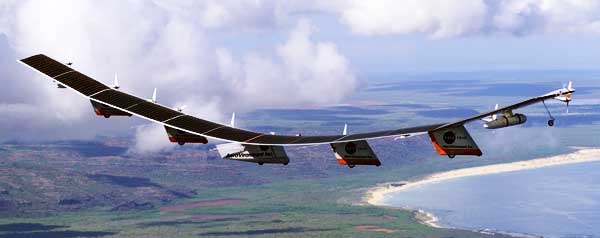
Google just announced project Loon (Google Blog, AFP article, and Wired article).  This is a scheme to provide internet access to folks in the southern hemisphere from high altitude balloons.  Short take: they can steer the balloon, which is potentially the required gamechanger, the balloon is too big for their stated payload, and it'll need to get bigger if they want to build a global WiFi hotspot.

This is Google's second try at the southern hemisphere problem.  In 2008 they helped start O3b Networks, which is attempting to launch a low earth orbit satellite constellation that would provide broadband access.

I'll start with a small point.  Something is odd about the size of the balloon.  The stated payload is 10 kg and the stated balloon is 15 meters in diameter, 3 mil thick polyethylene, and operates at 60,000 feet.  That's too big a balloon for that payload.

The stated balloon envelope will weigh about 20 kg.  So, they'd need about 30 kg of lift, which is about 30 m3 of helium at standard temperature and pressure.  But at 60,000 feet, the ambient density is around 100 g/m3 and helium density is around 14 g/m3.  So that's around 360 m3 of volume.  Google's 15 meter balloon holds 1767 m3 and is sized to pick up something a lot bigger.

So, I'm guessing they actually want to lift something more like 100 to 150 kg.  The helium to fill that is around $1300, the balloon is another $1500 in quantity, and the payload will be around $2k (but see below).

I wondered if they'd lose helium fast.  It turns out, no.  According to this table, the helium permeability of polyethylene is 5.3e-8 cm^2/sec. The 'Loon probably has 235 m^2 of 75-micron-thick polyethylene, and so leaks 1.4 m^3/day. I'm surprised at how small that is... sounds like they could stay up for a year if the balloon is fully inflated and residence was limited by leakage. My guess is that time aloft will be limited by ultraviolet breakdown of the polyethylene and by wind shear occasionally ripping the things apart.

Assuming that ground terminals require a line of sight to the 'Loon at least 10 degrees above the horizon, each 'Loon covers a circle 200 km in diameter.  Uniformly covering the whole earth would take 16,300 balloons.  But they aren't going to cover the whole earth, and they had better not cover it uniformly.

The first big rollout, if it ever happens, will be over the Hadley cell between 30 and 60 degrees south of the equator, and will cover primarily Australia, New Zealand, Argentina, South Africa, Chile, and Uruguay.  They'll need around 3000 balloons to get complete coverage.  The second big rollout will be over the Hadley cell between the equator and 30 degrees south, will require 4000 balloons, and will primarily cover Indonesia and Brazil.  There will be major objections to these overflights in all the affected countries, and I'm not sure how Google will try to overcome those.  But covering 1 billion people for $15m is pretty awesome.

The next logical rollout would be over the Hadley cell between the equator and 30 N.  Once again, it would take 4000 balloons and cover India, the Philippines, most of central Africa, everything from Columbia to central Mexico.  I just can't imagine this ever being accepted by governments with the ability to shoot down unwanted overflying balloons.  The next Hadley cell north gets China and the US and is even less politically feasible.

The 'Loon has a proprietary link to the ground stations.  Why not WiFi?  The problem is that a single 'Loon will often cover 100,000 cellphones, each with a WiFi endpoint.  Without some way to separate all those signals, the 'Loon will just see noise.  A proprietary link allows Google to throttle the number of simultaneously transmitting terminals, and add coding gain, to get enough signal to noise ratio to communicate over dozens of km.  Basically, the proprietary link is a way to shake the tree and see how governments react to a potentially uncensorable global ISP.

The better solution, the one I'm sure the Google engineers would love to implement, would be to put 802.11ac on the 'Loon.  802.11ac is the next-generation wireless Ethernet standard, and it will be on all smartphones in two years.  Crucially, the standard protocol requires the handsets give the access point the feedback necessary for the access point to use phased array antennas to form beams.  Those beams have two big consequences.
  • The beams let the 'Loon capture more of the energy transmitted from the handset.  A 6 m diameter phased array should capture enough energy from a cellphone at 40 km to enable 2-3 Mb/s transmission.  I don't know that 802.11ac has a LDPC code that lets it go that slowly, but if not, Google may be able to require that Android handsets implement an additional optional royalty-free code.
  • The beams let the 'Loon distinguish between tens of thousands of handsets simultaneously.  A 6 meter diameter phased array could implement cells on the ground 250 m diameter (right under the balloon) to 500 x 1000 m (far away from the balloon).  This density isn't going to let folks in Cape Town watch HDTV via YouTube, but it'll handle email and web surfing just fine.
It's interesting to think about the parallels between this idea and the 1990s idea of having a constellation of low earth orbit satellites providing broadband access.  At least five different schemes were proposed.  Iridium and Globalstar, both providing cellphone coverage, were actually built, and both went broke.  Teledesic, backed by Bill Gates, Paul Allen, and Saudi prince Alwaleed bin Talal, got canned before it launched it's constellation.  The problems with all these schemes were:
  1. The handsets were bulky and heavy because the satellites were 400 km up and 1000 km away.  'Loon cuts the range by more than an order of magnitude, which cuts the antenna size on both the access point (balloon) and handset by an order of magnitude.
  2. The constellations required custom handsets.  'Loon has this problem too but 802.11ac is a path to a solution.
  3. The access point hardware went on satellites which are expensive and hard to maintain.  The balloons should be easier to maintain... than satellites.  Though it's better than satellite constellations, I'd still count this issue against 'Loon.
  4. The orbital geometry meant that coverage was concentrated near the poles, where there aren't many people.  'Loon does not have this problem.
  5. The schemes required access point hardware sufficient to cover the entire earth, but only provided value where there were customers.  'Loon has this problem even worse than Teledesic.  The Earth as a whole is about 30% land, but the southern hemisphere is 19% land.  Worse yet, only 12% of the world's population lives in the southern hemisphere.  This problem can kill 'Loon.
There are currently two broadband LEO constellations in the works.  O3b, as mentioned above, and COMMstellation.  I don't see how either has fixed the problems that sunk Teledesic et al.


There has also been a bunch of work on broadband from High Altitude Platforms.  Balloons have been considered before, as have high altitude, long endurance aircraft, and interesting hybrids between the two.  In the late 90s, Angel Technologies was going to fly a Rutan-designed aircraft in the stratosphere, carrying a phased array broadband access point.  Aircraft can carry larger payloads (Halo could carry 1 ton), provide more power (Halo could provide 20 kilowatts), and can keep station over populated areas.  Stationkeeping fixes problem #5 above, and is a huge deal.

'Loon may have a new answer to problem #5.  They can steer.  Fast forward to 1:11 in this video.

Steering is a big difference from satellites.  Stratospheric winds will carry the 'Loons eastward around the globe, but if they can steer north-south while that is happening, they may be able to crowd the 'Loons over denser populations, and scoot across the oceans on the jet stream.  Steering could dramatically reduce the number of 'Loons needed.


Technology developments to watch for:

A solar power array that faces nearly sideways, steered toward the sun with fans or something.  Google is going to need this for the first big rollout, since the sun will not be more than 20 degrees above the horizon for most of the winter, and the grazing angle will kill their panel efficiency.

An ASIC that enables a 802.11ac access point to handle 1000 transceivers in less than 5 kilowatts.  They are going to need this chip for the last forseeable rollout, the one that interfaces directly to cellphones and turns Google into a global ISP for Brazil and Indonesia at least.  The ASIC is required because this generation 'Loon will be constrained by power.  Power requires big solar arrays and batteries to get through the night, and those require a bigger, stronger balloon.

A balloon-to-balloon optical link consisting of multiple small gimbal-stabilized telescopes, perhaps two inches in diameter, to relay the photons between 10 gigabit ethernet fiber optic transceivers.  I've wanted to see this technology for years, but the killer app hasn't shown up yet, because at ground level the weather would frequently disrupt any link.  At 60k feet that shouldn't be a problem.  They'll need this technology for that last big rollout.  I don't think radios are going to work well enough.

As a camera nerd, I can't help but note the temptation to put a 2 kg camera on each 'Loon. You'd get something like hourly coverage of everywhere at 12 inch resolution, and real-time video coverage of smaller targets (like traffic accidents) as well. There is a real market for that... SkyBox Imaging just got $90m in venture capital to address it.  This imagery, piped into Google Maps/Earth, would provide the live view of the entire earth that everyone already expects to be there.

Friday, December 14, 2012

Cloud + Local imagery storage

The Department of Homeland Security has said that it wants imagery delivered in the cloud. Several counties and states have expressed the same desire. Amazon S3 prices are quite reasonable for final imagery data delivered, especially compared to the outrageous prices that imagery vendors have been charging for what amounts to a well-backed-up on-site web server with static content. I've heard of hundreds of thousands of dollars for serving tens of terabytes.

Everyone wants the reliability, size, and performance scalability of cloud storage. No matter how popular your imagery becomes (e.g. you happen to have the only pre-Sandy imagery of Ocean City), and no matter how crappy your local internet link happens to be, folks all around the world can see your imagery. And many customers are more confident in Amazon or Google backups than their local IT backups.

But everyone also wants the reliability of local storage. E911 services have to stay up even when the internet connection goes down. So they need their own local storage. This also helps avoid some big bandwidth bills on the one site you know is going to hammer the server all the time.

So really, imagery customers want their data in both places. But that presents a small problem because you do want to ensure that the data on both stores is the same. This is the cache consistency problem. If you have many writers frequently updating your data and need transaction semantics, this problem forces an expensive solution. But, if like most imagery consumers you have an imagery database which is updated every couple of months by one of a few vendors, with no contention and no need for transaction semantics, then you don't need an expensive solution.

NetApp has a solution for this problem which involves TWO seriously expensive pieces of NetApp hardware, one at the customer site and one in a solo site with a fat pipe to Amazon. The two NetApp machines keep their data stores synchronized, and Amazon's elastic cloud accesses data stored at the colo over the fat pipe. This is... not actually cloud storage. This is really the kind of expensive shoehorned solution that probably pisses off customers more than me because they have to write the checks.

The right answer (for infrequently-updated imagery) is probably a few local servers with separate UPSes running Ceph and something like rsync to keep updates synchronized to S3. Clients in the call center fail over from the local servers to S3, clients outside the call center just use S3 directly.

I feel sure there must be some Linux vendor who would be happy to ship the Nth system they've build to do exactly this, for a reasonable markup to the underlying hardware.

Monday, March 01, 2010

Good, Bad, and Ugly

The Good:
I just made myself a goat cheese and apple omelette. Yum! Could have use just a little red onion, and the apple chunks were too large. I will definitely get that right next time.

The Bad:
SolidWorks is crashing on me about every 30 minutes right now. This is not helping me get ready for my presentation tomorrow.

The Ugly:
My eyes. I have red eye, which has all kinds of consequences. Like, getting to stay at home and make myself omelettes. Like, not being able to read small text anymore (should be temporary -- being even slightly blind would truly suck). Like, not being able to make my presentation tomorrow. I sure hope my boss does a decent job.

Monday, November 23, 2009

System Design for Martha

I need to buy a new computer for Martha.
  • Must drive a flat panel display
  • Must accept data from a FireWire miniDV camera
  • Must have a DVD burner
  • We have an ancient parallel-port printer.... which would be nice to use.
I could buy a Mac Mini. The Mac Mini has the FireWire interface and DVD burner. However, it will never work with that printer (a replacement will cost $150). The graphics would be much better than any mini-ITX integrated graphics I'd get. We'd get the 2.53 GHz, 4 GB memory, 350 GB version, $830. A VMware executive will cost another $70. The whole thing will come in a nice little case and make very little noise, and I will have even less idea how the software works than I do with the PC.

Or, I could build a PC. I'd get a 3.16 GHz Intel E8500, 8GB memory, 500 GB hard drive. I can get a FireWire card and a DVD burner, and a motherboard that sports a parallel port. Martha will be happy that I didn't make her figure out a Mac (more to the point, how to run PC-only software under VMware on the Mac). Vista will almost certainly never work with the printer, and so I'll still have to get a replacement anyway (a wash at $150). Even crammed into a mini-ITX case (with some risk it will not all fit in the case), it'll cost $875. The Mini idles at 14 watts, and any PC I build will idle at 35 watts. The 20 watt difference, over 5 years of 24/7, costs an extra $350.

Update: Since Martha figures she's going to be stuck with the sysadmin, she opted for the PC, to avoid learning about VMware, Boot Camp, or any other virtualization. If we could order the Mac Mini with Windows preinstalled under a supervisor, such that I could have told Martha that she could simply install any Windows programs or drivers, then she probably would have gone for that. Oh well.

Tuesday, April 29, 2008

How GPUs are better than CPUs

Intel has a great CPU core right now, AMD does not, and in combination with Intel having higher-performance silicon, Intel is currently beating AMD handily. Meanwhile, Intel and AMD are both integrating graphics into the CPU and NVidia probably feels sidelined. So NVidia says that the CPU is dead. I agree, a little.

Many things people want to do these days are memory bandwidth limited. Editing/recoding video, or even tweaking still pictures and playing games are all memory bandwidth limited. GPUs have far better memory bandwidth than CPUs, because they are sold differently.

The extra bandwidth comes from five advantages that GPUs enjoy:
  • GPU and memory come together on one board (faster, more pins)
  • point-to-point memory interface (faster, lower power)
  • cheap GPU silicon real estate means more pins
  • occasional bit errors in GPU memory are considered acceptable
  • GPUs typically have less memory than CPUs
When people buy CPUs, they buy the memory seperately from the CPU. There are 2 chip carriers, one socket, a PC board, and one DIMM connector between the two. In comparison, when people buy GPUs, they buy the memory and the GPU chip together. There are 2 chip carriers and a PC board between the two.

CPU memory interfaces are expected to be expandible. Expandibility has dropped somewhat, so that currently you get two slots, one of which starts out populated and the other of which is sometimes populated and sometimes not. The consequence is that the CPU to DRAM connection has multiple drops on each pin.

GPUs always have one DRAM pin to each GPU pin. If they use more DRAM chips, those chips have more narrow interfaces. Because they are guaranteed point-to-point interfaces, the interfaces can run at higher speed, generally about twice the rate of CPU interfaces.

CPU silicon is optimized for single-thread performance -- both Intel and AMD have very high performance silicon. As a result, the silicon costs more per unit area than the commodity silicon the GPUs are built with. The "programs" that run on GPUs are much more amenable to parallelization, which is why GPUs can be competitive with lower-performance silicon.

It turns out that I/O pins require drivers and ESD protection structures that have not scaled down with logic transistors over time. As a result, pins on CPUs cost more than pins on GPUs, and so GPUs have more pins. That means they can talk to more DRAM pins and get more bandwidth.

All of the above advantages would apply to a CPU if you sold it the same way a GPU is sold. The final two advantages that GPUs enjoy would not apply, but are easy to work around.

The first is the acceptability of bit errors. GPUs do not have ECC. It would be easy to make a CPU/GPU that had a big wide interface with ECC.

The second is the memory size. GPUs typically connect to 8 or 16 DRAM chips with 32b interfaces each. It would be straightforward to connect with 64 DRAM chips with 8b interfaces each. If fanout to the control pins of the DRAMs becomes a problem, off-chip dedicated drivers would be cheap to implement.

So, I think integrated CPU/GPU combinations will be interesting for the market, but I think they will be more interesting once they are sold the way GPUs are sold today. Essentially, you will buy a motherboard from Iwill with an AMD CPU/GPU and 2 to 8 GB of memory, and the memory and processor will not be upgradable.

For servers, I think AMD is going in the right direction: very low power (very cheap) mux chips which connect perhaps 4 or even 8 DRAM pins to each GPU/CPU pin. This solution can maintain point-to-point electrical connections to DIMM-mounted DRAMs, and get connectivity to 512 DRAM chips for 64 GB per GPU/CPU chip.